Your NVIDIA® SHIELD™ controller works with your SHIELD
device using Wi-Fi Direct for exceptional responsiveness and immersion
in today's hottest games. It is the first-ever precision controller
designed for both Android™
and PC gaming. Use the SHIELD controller when connected to a TV
for multi-player games. You can connect up to four SHIELD controllers
to your SHIELD device.
The controller includes the following features:
Console-grade
controls
Ultra-responsive
Wi-Fi performance
Stereo
headset jack with chat support
Microphone
for voice search
Touch
pad for easy navigation
Rechargeable
battery and USB charging cable
For detailed information
on the SHIELD controller, refer to documentation that comes with the controller.
Connect SHIELD Controller to your SHIELD Tablet K1
Verify
that your SHIELD tablet K1 has Wi-Fi turned on. It does not
have to connect to a network, but Wi-Fi must be turned on.
Open
the SHIELD Accessories app on your
SHIELD device.
Tap
the NVIDIA button on the
wireless controller. The NVIDIA button flashes to show that
the controller is in connecting (pairing) mode.
If the NVIDIA button is not flashing, hold the NVIDIA button until
it starts flashing, and then release.
When
the controller is connected, you can press to open
the Quick Guide, Settings, or Help. A controller icon
shows in the status bar on your SHIELD device. This icon indicates
that the controller is on and connected. The white portion of
the icon indicates the amount of charge left in the controller.
Optional: You can connect up to
four SHIELD controllers to your SHIELD device. Repeat Steps
1 through 4 to connect each additional controller.
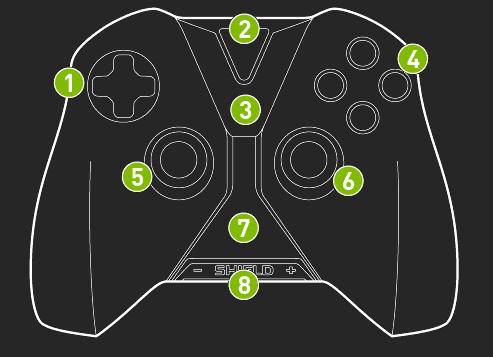
SHIELD Controller Overview
The SHIELD controller box includes one SHIELD controller,
one USB charging cable, one Support Guide, and one Quick Start Guide.
D-pad
NVIDIA button
Android navigation and Start buttons
A-B-X-Y buttons
Left thumbstick
Right thumbstick
Touchpad
Volume control
How to Turn On the Controller
Tap the NVIDIA button.
How to Turn Off the Controller
Hold the NVIDIA button for 6 seconds.
The controller automatically turns off when
you turn off the SHIELD device the controller is connected to. The
controller also automatically turns off after 10 minutes of idle time.
The controller stays on during video and music playback on the SHIELD
device. This allows the controller to be active to control media
playback.
 on your
SHIELD device.
on your
SHIELD device. on the
wireless controller. The NVIDIA button flashes to show that
the controller is in connecting (pairing) mode.
on the
wireless controller. The NVIDIA button flashes to show that
the controller is in connecting (pairing) mode.  to open
the Quick Guide, Settings, or Help. A controller icon
to open
the Quick Guide, Settings, or Help. A controller icon  shows in the status bar on your SHIELD device. This icon indicates
that the controller is on and connected. The white portion of
the icon indicates the amount of charge left in the controller.
shows in the status bar on your SHIELD device. This icon indicates
that the controller is on and connected. The white portion of
the icon indicates the amount of charge left in the controller.